Kascado / WooCommerce / Customer Dashboard
B2B Customer Dashboard for WooCommerce

See Which B2B Customers Are Slipping Away

Track which B2B customers are active, at-risk, or dormant and see exactly which accounts are putting revenue at risk. Free plugin for WooCommerce, built for B2B store owners.

Read the documentation
WHAT IT DOES

How the B2B Customer Dashboard Tracks Account Health

Customer Dashboard adds WooCommerce B2B customer analytics to your store admin. Every B2B customer is classified as active, at-risk, or dormant based on order behavior. Revenue concentration shows up in your store’s currency, not just customer counts. Reorder cycles are tracked per customer. Accounts that need attention surface automatically.

This is the customer analytics layer WooCommerce never built. It runs entirely inside your store admin with no SaaS fees, no external APIs, and no data leaving your server.

FEATURES

Everything in Customer Dashboard

Built for B2B WooCommerce stores. Free forever, no feature gates.

Active, at-risk, and dormant customer classification
Auto-detects B2B customers from major wholesale plugins
Revenue at risk quantified per customer
Slipping account detection (catches drift before customers churn)
Growth opportunity detection (recent revenue increases above baseline)
Per-customer reorder cycle calculation
Configurable activity thresholds for active and at-risk states
Custom B2B role support and excluded accounts list
Sortable customer table with status filters
CSV export with active filters
HPOS compatible
Self-hosted, no SaaS, no external API calls
HOW IT WORKS

How Customer Dashboard Tracks B2B Customer Health

Revenue at Risk, Quantified Per Customer

Most analytics tools tell you "12 customers are at risk." Customer Dashboard tells you exactly how much revenue is at stake, displayed in your store's currency.

  • Annualized at-risk revenue plus lifetime dormant revenue, combined into one figure
  • Drill into the customer table to see which accounts contribute to the total
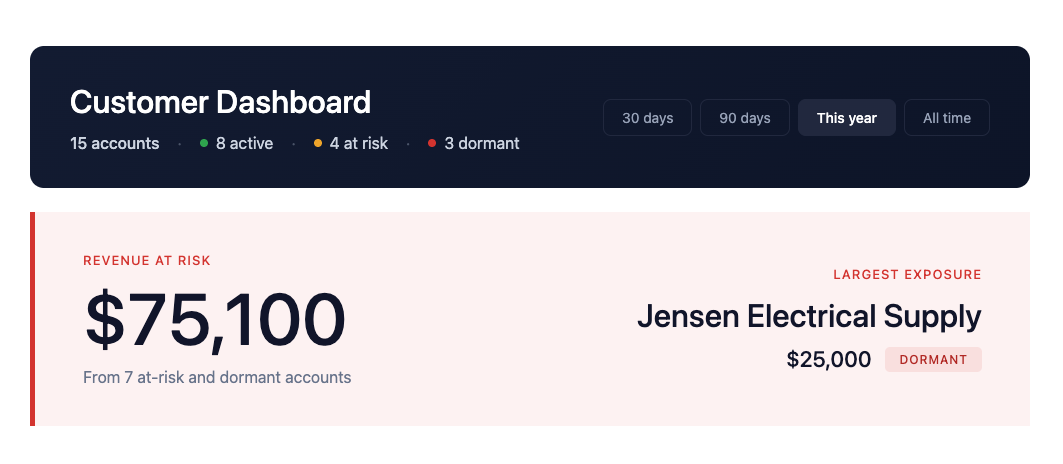
Revenue at risk banner showing $75,100 from 7 at-risk and dormant accounts, with largest exposure to Jensen Electrical Supply at $25,000

Customer Classification, Tuned for Your Business

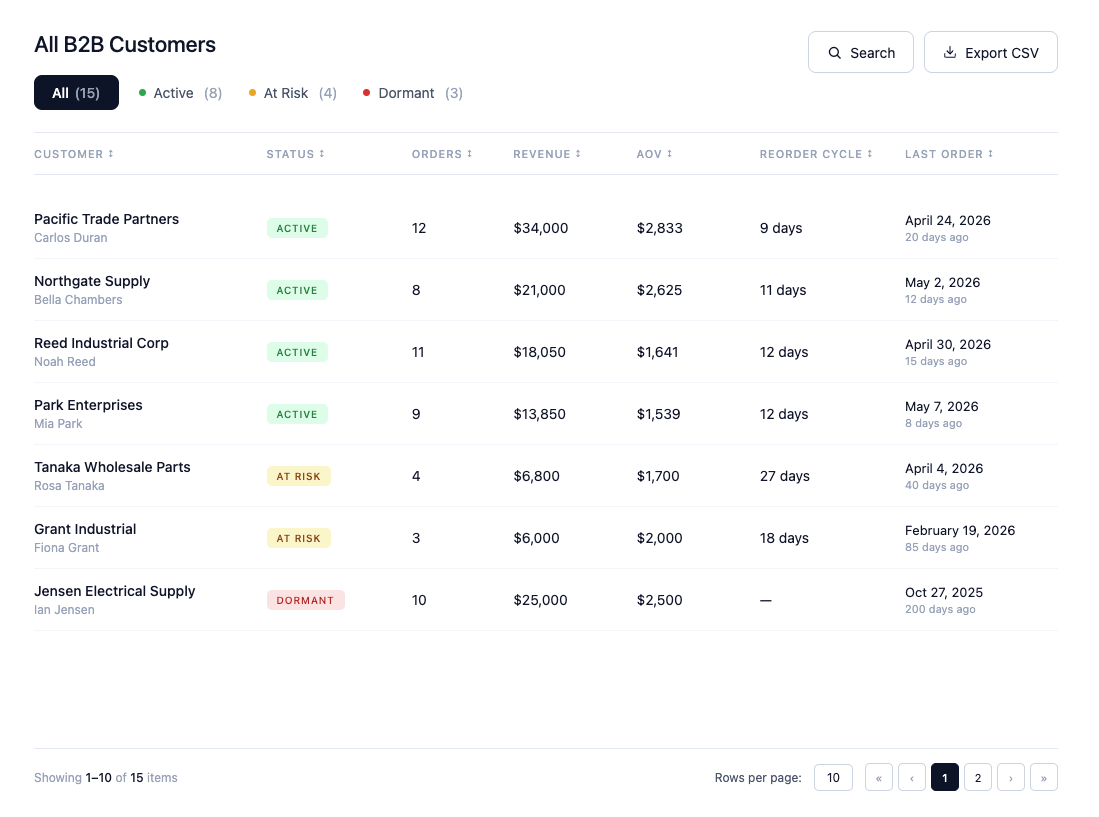
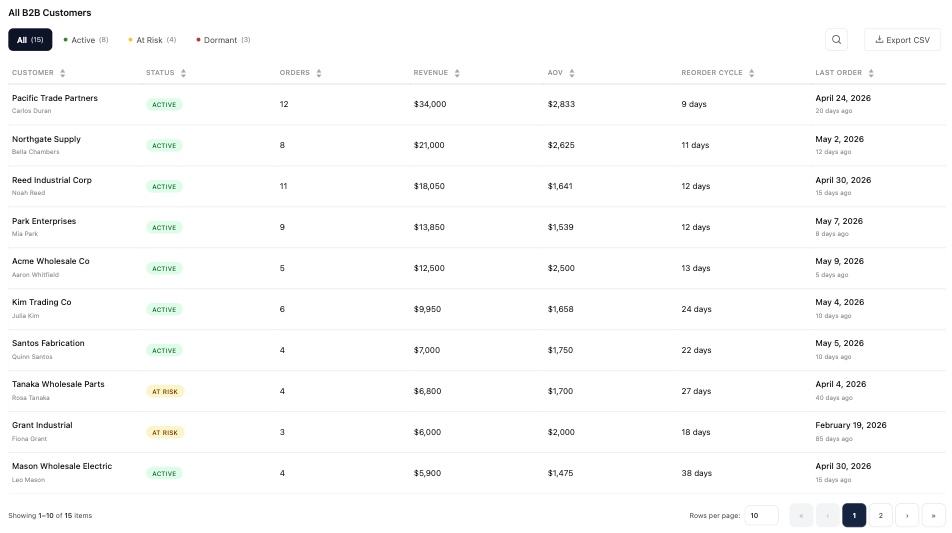
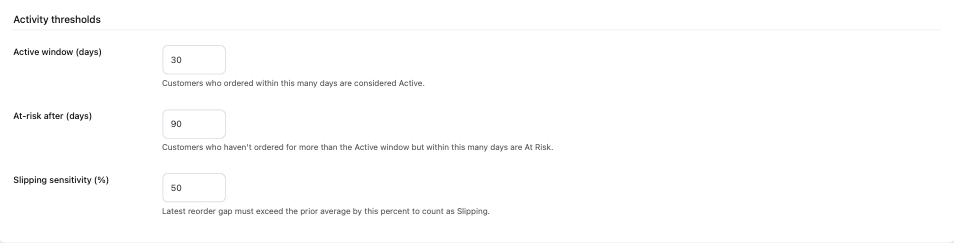
Every B2B customer is classified as active, at-risk, or dormant based on configurable thresholds. Defaults work for typical wholesale. Adjust them for industrial supply, equipment, or other slower-moving categories.

  • Configurable thresholds for active and at-risk states
  • Color-coded status badges, filterable and sortable in the customer table
B2B customer table showing active, at-risk, and dormant status badges with revenue, orders, AOV, reorder cycle, and last order columns

Slipping and Growth Detection

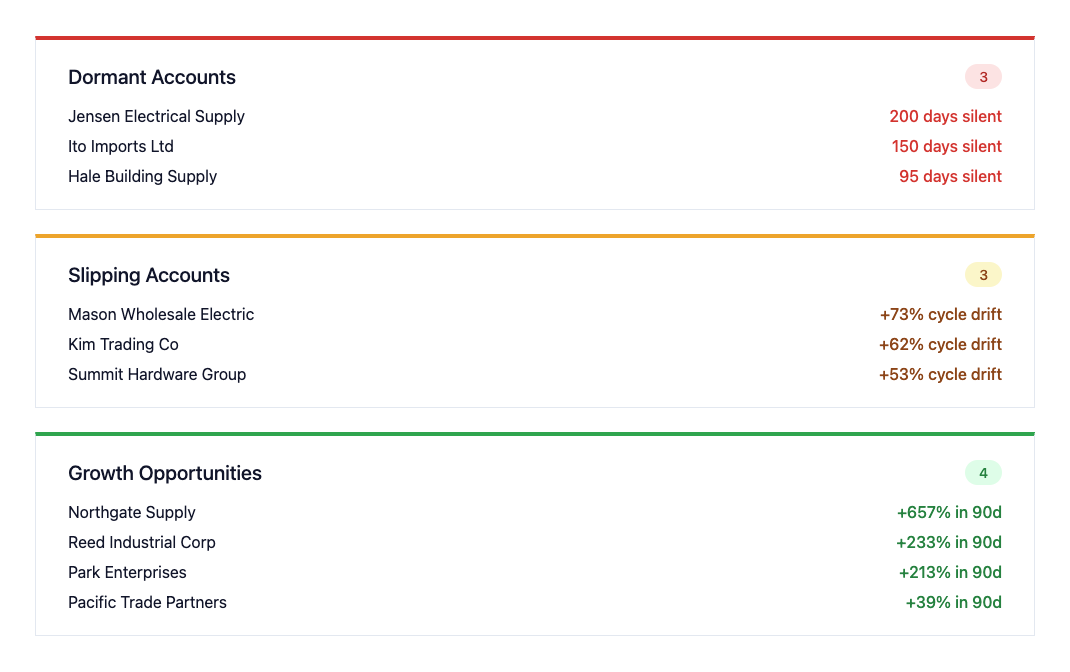
Customer Dashboard tracks per-customer reorder patterns. Customers whose cycle is drifting appear in Slipping alerts before they become at-risk. Customers whose recent revenue is climbing appear in Growth alerts.

  • Slipping alerts catch problems before they turn into revenue loss
  • Growth alerts identify accounts worth deepening the relationship with
Dormant, Slipping, and Growth alert cards with customer names and metrics

Built for B2B From the Ground Up

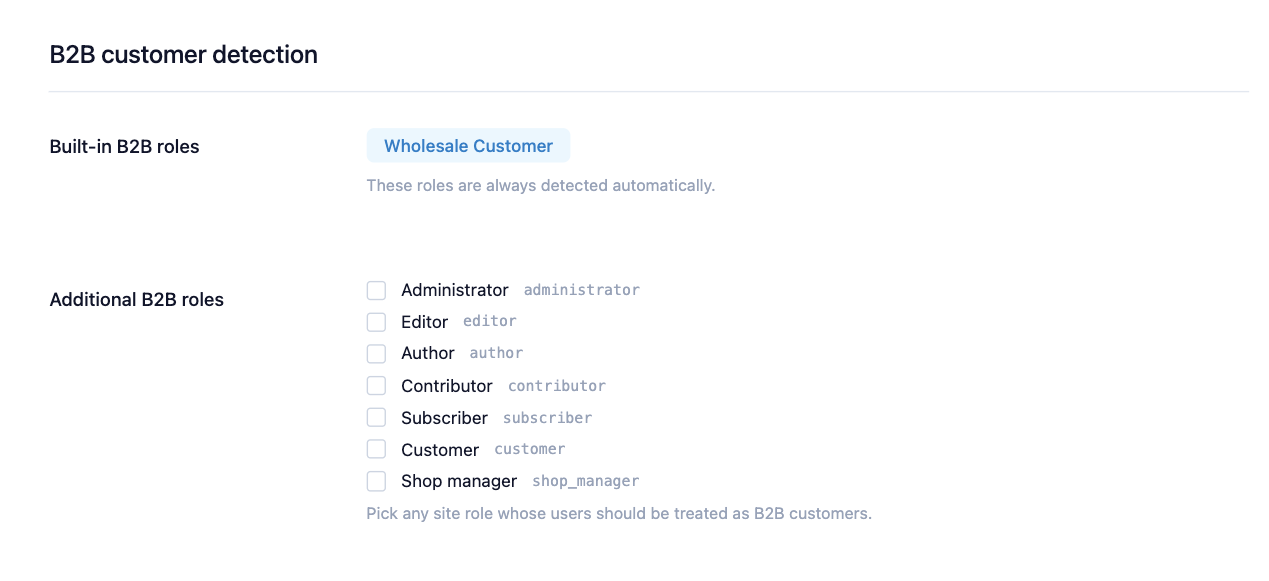
Customer Dashboard auto-detects B2B customers from the customer roles your existing setup created. No manual tagging, no duplicate roles, no setup beyond install.

  • Reads from existing customer roles, with custom role support for non-standard setups
  • Optional order-count fallback identifies B2B buyers without an explicit role
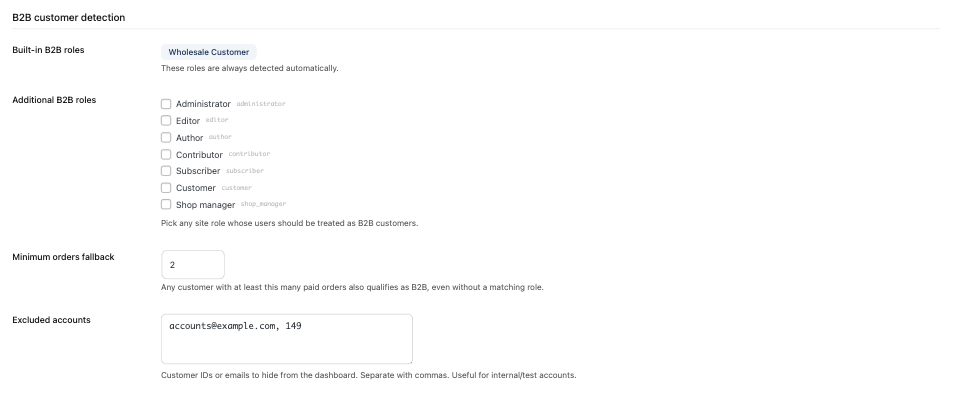
B2B customer detection settings showing built-in role detection, additional role checkboxes, minimum orders fallback, and excluded accounts configuration
SCREENSHOTS

See It in Action

Main dashboard with revenue at risk overview
Dormant, slipping, and growth account alerts
Sortable customer table with health classifications
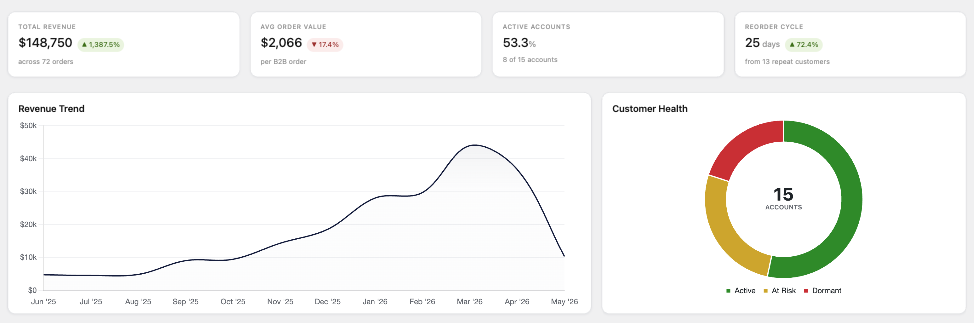
Performance metrics with revenue trend chart
B2B customer detection with custom role support
Configurable activity thresholds
WORKS WITH

Kascado for Wholesale

Customer Dashboard works fully on its own. It is part of the Kascado for Wholesale product line alongside Customer Statements and AR Tracker. Each plugin solves a different operational problem. Customer Statements and AR Tracker integrate with each other; Customer Dashboard runs independently today.

Free Coming soon
Customer Statements Branded PDF customer statements for B2B WooCommerce stores. Generate, email, and manage period statements from the WooCommerce admin. View plugin
Free + Pro Coming soon
AR Tracker WooCommerce-native accounts receivable. Free Lite tier for charge visibility. Pro adds payment recording, aging reports, and automated reminders. View plugin
FAQ

Common Questions About the WooCommerce Customer Dashboard

Customer Dashboard is the B2B customer dashboard for WooCommerce stores. It adds customer health analytics to the WooCommerce admin. Every B2B customer is automatically classified as active, at-risk, or dormant based on order behavior. The dashboard surfaces revenue concentration risk in your store’s currency, tracks per-customer reorder cycles, flags slipping accounts, and identifies growth opportunities. It runs entirely inside WooCommerce, with no external APIs, no SaaS, and no data leaving your server.
Yes, completely free. No premium tier inside the admin, no feature gates, no time limits. Customer Dashboard is a complete product that works on its own. Other Kascado plugins (like the paid AR Tracker Pro) are separate products and don’t change what Customer Dashboard does. Free forever. Launching on WordPress.org.
Yes, fully. Customer Dashboard detects B2B customers from B2BKing, WholesaleX, and Wholesale Suite. No manual customer tagging required. We don’t create duplicate roles or conflict with their data structures. The plugin detects the active order storage backend and uses a query path appropriate to each, with full HPOS and legacy post-based storage support. Compatible with all three. If you’re already running one of these plugins, Customer Dashboard adds the analytics layer they don’t include, without disrupting your existing setup.
Three-tier detection identifies B2B customers without manual tagging. First, it checks for known B2B roles (wholesale_customer, b2bking_customer). Second, it checks B2BKing customer group meta and WholesaleX role meta. If neither method finds any B2B customers, a configurable order-count fallback activates as a last resort (default: 2+ orders). Custom B2B roles can be added in settings if your store uses non-standard role names. An excluded accounts list lets you remove specific user IDs or emails from the dashboard entirely.
Customer Dashboard provides at-risk customer tracking for WooCommerce stores. Specifically: revenue at risk in your store’s currency (combined revenue from at-risk and dormant customers), per-customer revenue, orders, and average order value, per-customer reorder cycles, active/at-risk/dormant classification per customer, slipping account detection (cycle drift), growth opportunity detection (recent revenue lifts), and monthly revenue trends. All tied to a sortable, filterable customer table with CSV export.
Install Customer Dashboard from WordPress.org once it’s approved. The plugin automatically classifies every B2B customer as active, at-risk, or dormant based on order behavior. Active means the customer ordered within the active threshold (default 30 days). At-risk means their last order falls between the active and at-risk thresholds (default 30–90 days). Dormant means they haven't ordered past the at-risk threshold. A Slipping flag overlays any state when a customer's reorder cycle drifts beyond a configurable percentage — an early warning that a customer's ordering pace is declining. No manual tracking, no spreadsheets, no external tools.
Yes, thresholds are configurable. Active days (default 30, minimum 1). At-risk days (default 90, must be higher than active days). Customers past the at-risk threshold automatically become Dormant. Slipping percentage (default 50%, range 1 to 500%) controls how much a customer's reorder cycle must drift to trigger a Slipping alert. Defaults work for typical B2B wholesale. Tune them for industrial supply, equipment, or other categories where reorder cycles are longer.
Yes. Customer Dashboard detects the active order storage backend and uses a query path matched to each — single-table access on HPOS, EAV joins on legacy post-based storage. Output is verified identical across both backends. HPOS compatibility is declared from the day it ships.
Customer Dashboard keeps customer data on your server. It runs entirely inside WordPress on your WooCommerce server with no external API calls, no SaaS connections, and no telemetry. The plugin only reads existing WooCommerce order data and never sends anything anywhere. Customer data, classifications, and analytics calculations all stay on the server you already control.
WooCommerce's built-in analytics show what your store sold: revenue, orders, top products, top customers by total spend. Customer Dashboard shows the health of each B2B customer relationship over time. Who's slipping. Who's dormant. Who's growing. Which accounts are putting revenue at risk. WooCommerce's analytics are sales analytics; Customer Dashboard is customer analytics. The two answer different questions, and most B2B store owners need both.
Install via wp-admin or upload from WordPress.org once it's approved. Activate, then open the dashboard. B2B customers are auto-detected from existing roles, classifications are applied with default thresholds, and charts populate from your order history. Optional setup takes 5 to 10 minutes: tune thresholds for your business, add custom B2B roles if your store uses non-standard role names, or configure the history scan window. Settings are accessible via the gear icon on the dashboard.
Customer Dashboard requires WordPress 6.2 or higher, PHP 8.0 or higher, and WooCommerce 8.0 or higher. It is tested up to WordPress 6.9. Multisite is not currently supported.
Customer Dashboard calculates analytics from WooCommerce order data and caches the results using WordPress transients. The cache is invalidated automatically when orders change. The dashboard loads from cache on subsequent visits, so the initial calculation runs once and subsequent page loads are fast. The customer table is sortable and filterable server-side, not client-side, so large customer lists don't slow down the browser.
Uninstalling Customer Dashboard removes all plugin data: settings, cached analytics, and transients. Your WooCommerce order data is never touched — the plugin only reads from it, never writes to it. Deactivating the plugin leaves all data intact so you can reactivate later without losing your configuration.
Every figure comes from your own order data, and the rules behind it are documented rather than hidden. Refunds are deducted from revenue. Orders are counted only if their status is in the revenue statuses you configure, which defaults to Completed and Processing. Guest orders are excluded, and the dashboard says so on screen with a count. Output is verified identical on both High-Performance Order Storage and legacy post-based storage, so the figures do not change if you migrate. Where the history window limits a date range, the dashboard tells you rather than quietly truncating the result.

Get Customer Dashboard at Launch

Free forever. No license, no limits, no SaaS. Customer Dashboard is being submitted to WordPress.org. Get notified when it's approved and ready to install.

Read the documentation