Kascado / WooCommerce / Accounts Receivable
Accounts Receivable

WooCommerce doesn't know what they paid.

Your wholesale customers pay by cheque and bank transfer, weeks after the order ships, and your store never sees the money arrive. Accounts Receivable keeps the other half of the record.

WHAT IT DOES

The spreadsheet nobody wants to own

Somewhere in your business there is a file listing who owes you money. It is rebuilt by hand every month, and it disagrees with WooCommerce, because WooCommerce was never asked.

An order goes out on NET 30. The customer pays six weeks later by cheque, covering three invoices and underpaying by the cost of a short shipment. None of that reaches your store. The order still says "processing", and always will.

Payment-terms plugins solve the front half — letting the customer check out without paying. The back half is where the spreadsheet comes from.

FREE PLUGIN

Everything in Kascado Accounts Receivable

Built for B2B WooCommerce stores. Free forever, no feature gates.

✓ Charges raised automatically from orders
✓ Choose which gateways mean "pay later"
✓ Record payments against the customer
✓ Oldest-invoice-first allocation
✓ Overpayments held as credit, applied to the next order
✓ Credits and write-offs with a written reason
✓ Append-only corrections, nothing ever deleted
✓ Refund, cancellation and order-edit handling
✓ Outstanding, overdue and credits-held totals
✓ Six-month receivables trend
✓ Import past orders from your order history
✓ Balances CSV export, safe to open in Excel
Download free No license, no subscription, no feature gates.
HOW IT WORKS

What every customer owes, on one screen

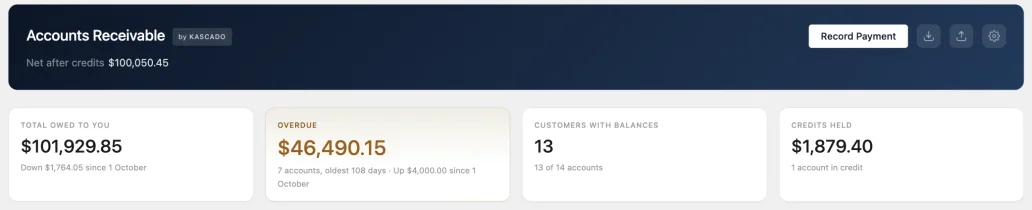
  • Total outstanding, overdue, customers carrying a balance and credits held.
  • Every figure is calculated from the ledger when you look at it — there is no cached balance to drift out of date.
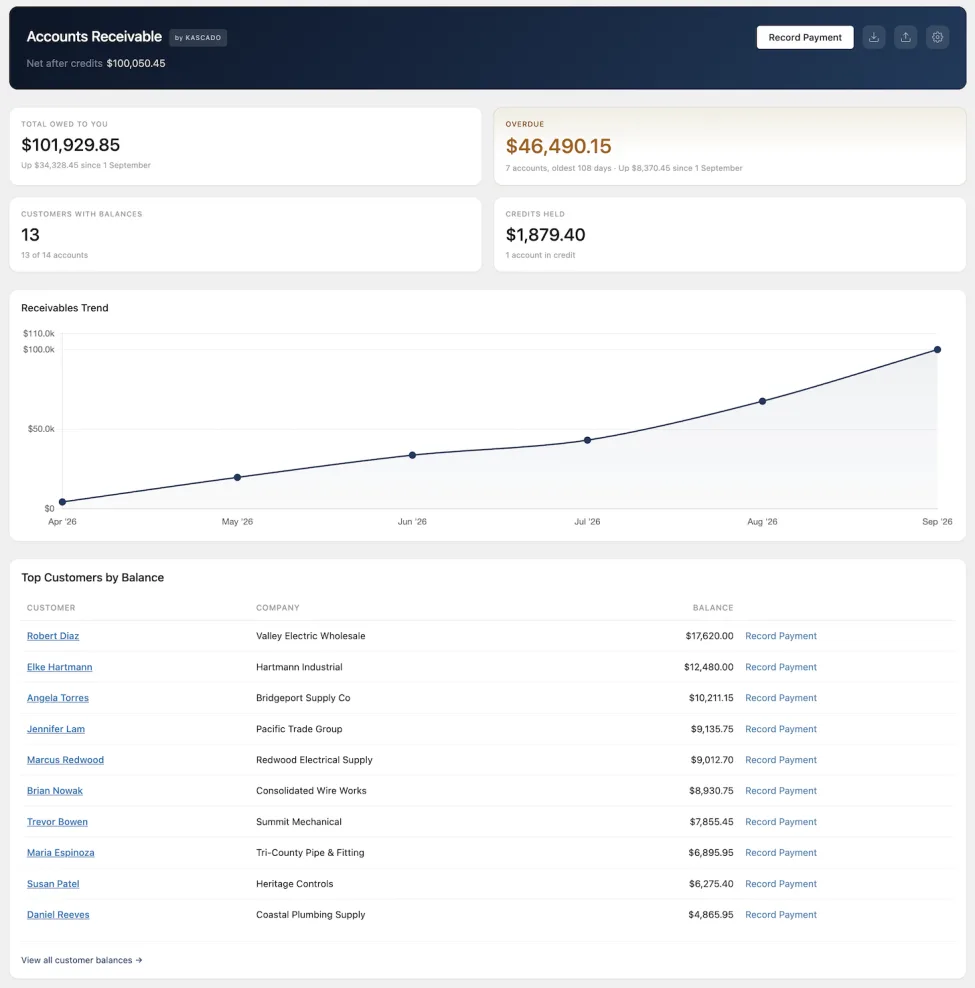
Top of the Accounts Receivable dashboard: net after credits in the header, then four tiles for total owed, overdue with the number of accounts and the oldest days overdue, customers with balances, and credits held

One payment, several invoices

  • Record one cheque against the customer; it settles their oldest open invoice first, then the next.
  • Anything left over is held as credit and used automatically by their next order.
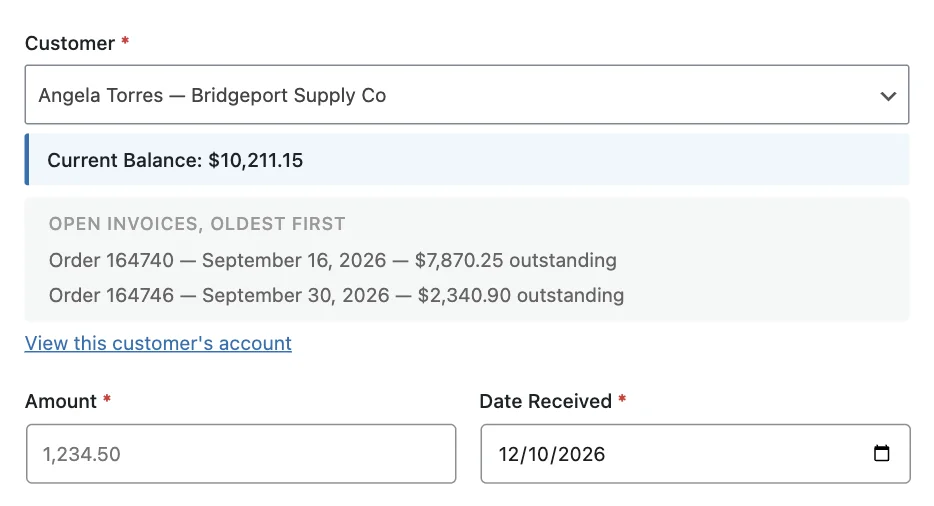
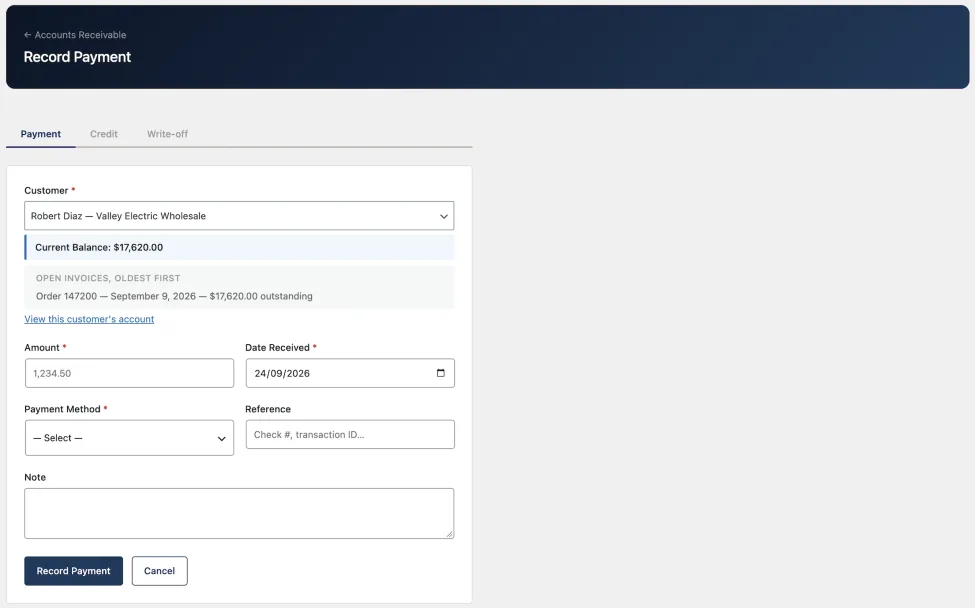
Record Payment form with a customer selected, showing their current balance and their two open invoices listed oldest first, above the amount and date received fields

A history that explains every figure

  • Nothing is edited or deleted. A mistake is corrected, and both entries stay visible with your reason attached.
  • Every entry, in order, with the balance after each one — so any figure on any screen can be traced back.
Account history table listing charges and payments by date, each with its order or payment reference, the amount, the balance after that entry, and a Reverse link

Start from what you're already owed

  • Scan a date range of past orders and bring them in as unpaid.
  • Or draw a line and track only what happens from today.
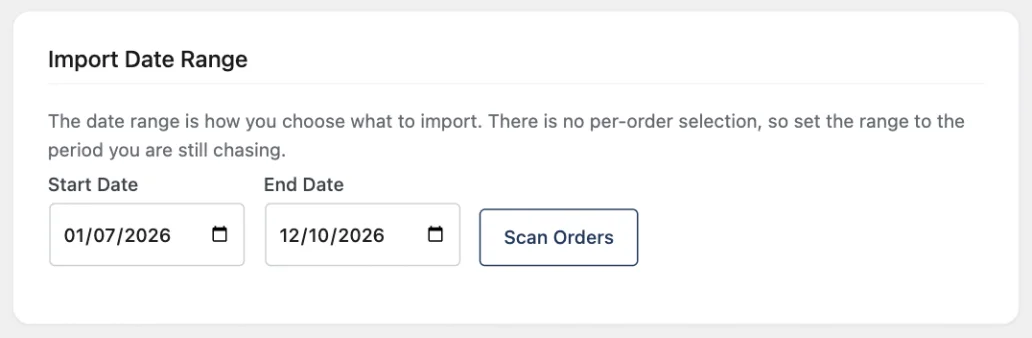
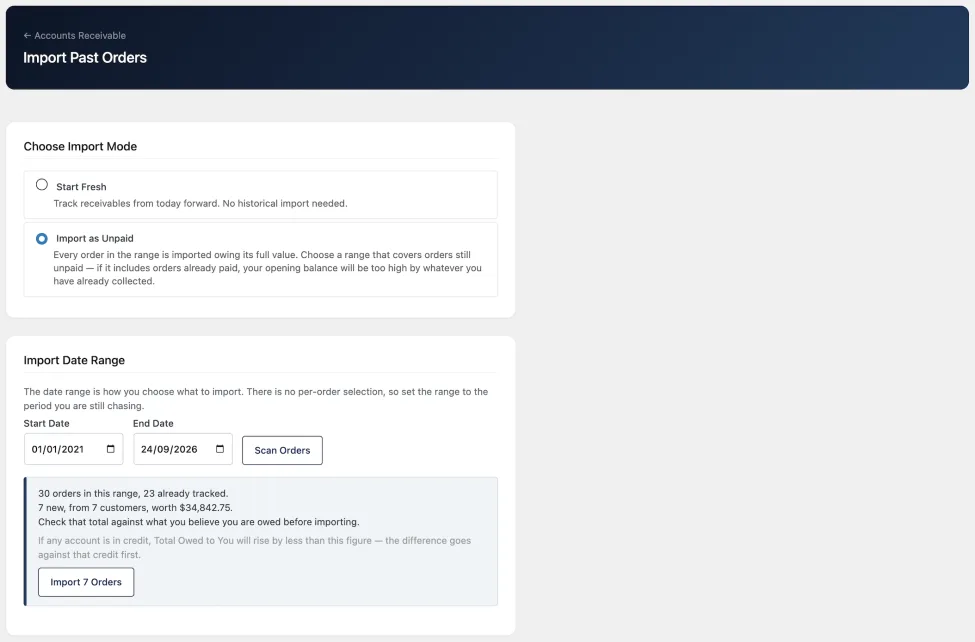
Import Date Range panel with a start date, an end date and a Scan Orders button
SCREENSHOTS

See It in Action

Accounts Receivable dashboard with tiles for total owed, overdue, customers with balances and credits held, a six-month receivables trend chart, and a table of the ten customers with the largest balances
The accounts receivable dashboard: outstanding total, customers carrying a balance, overdue amount and the receivables trend.
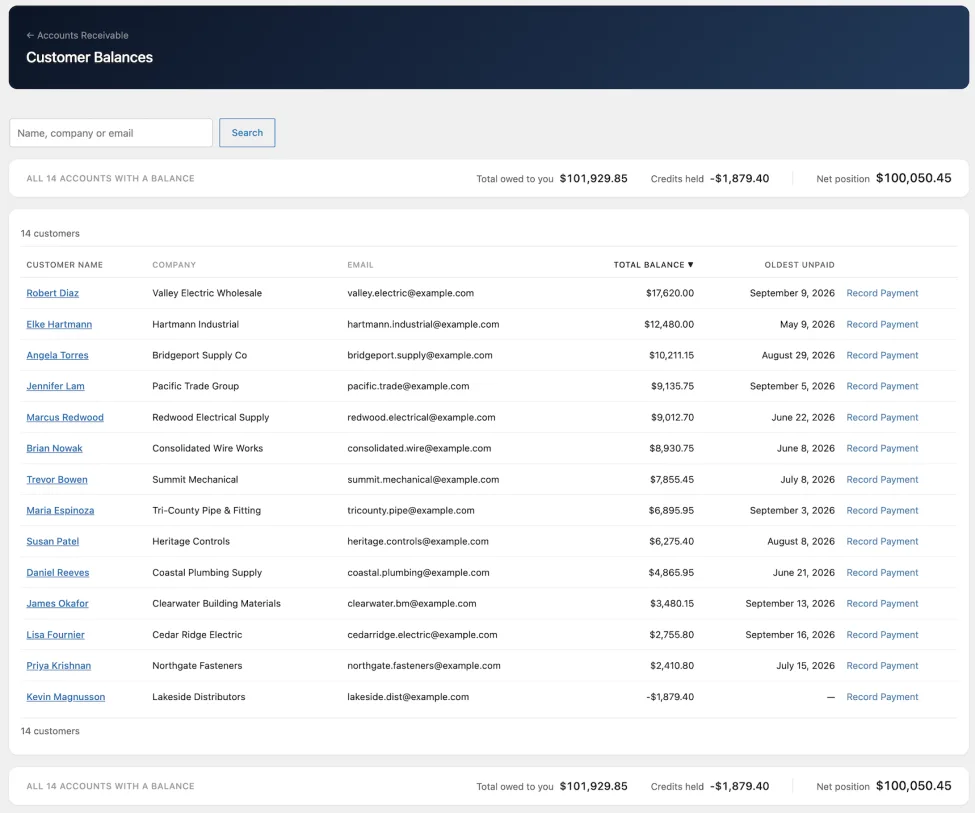
Customer Balances screen with a search box, store-wide totals for owed, credits held and net position, and fourteen customers listed by total balance with their oldest unpaid date
The customer list, sortable by balance, name or oldest unpaid date.
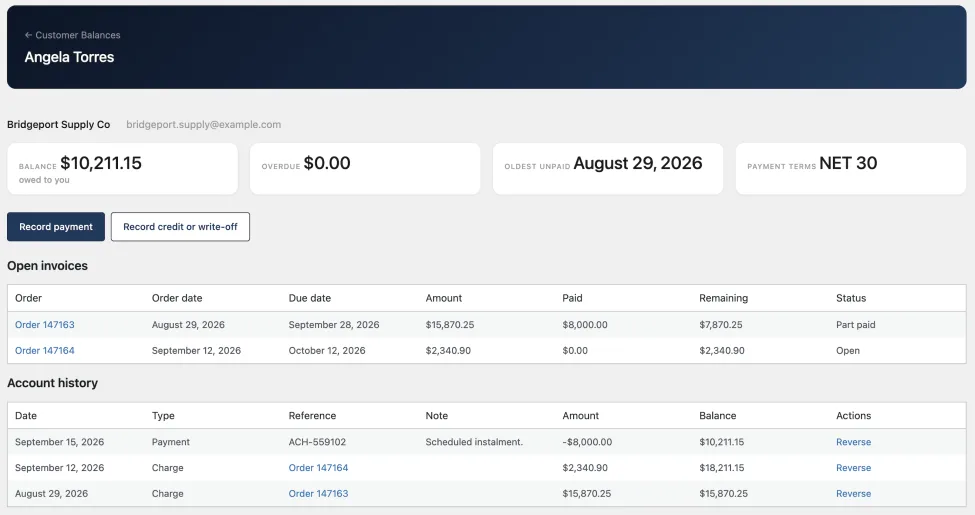
A customer account screen with cards for balance, overdue, oldest unpaid date and payment terms, a table of two open invoices showing amount, paid and remaining, and an account history with a running balance and a Reverse link on each entry
A customer's account: balance, overdue amount, oldest unpaid date and payment terms, above the open invoices and the full history with a running balance.
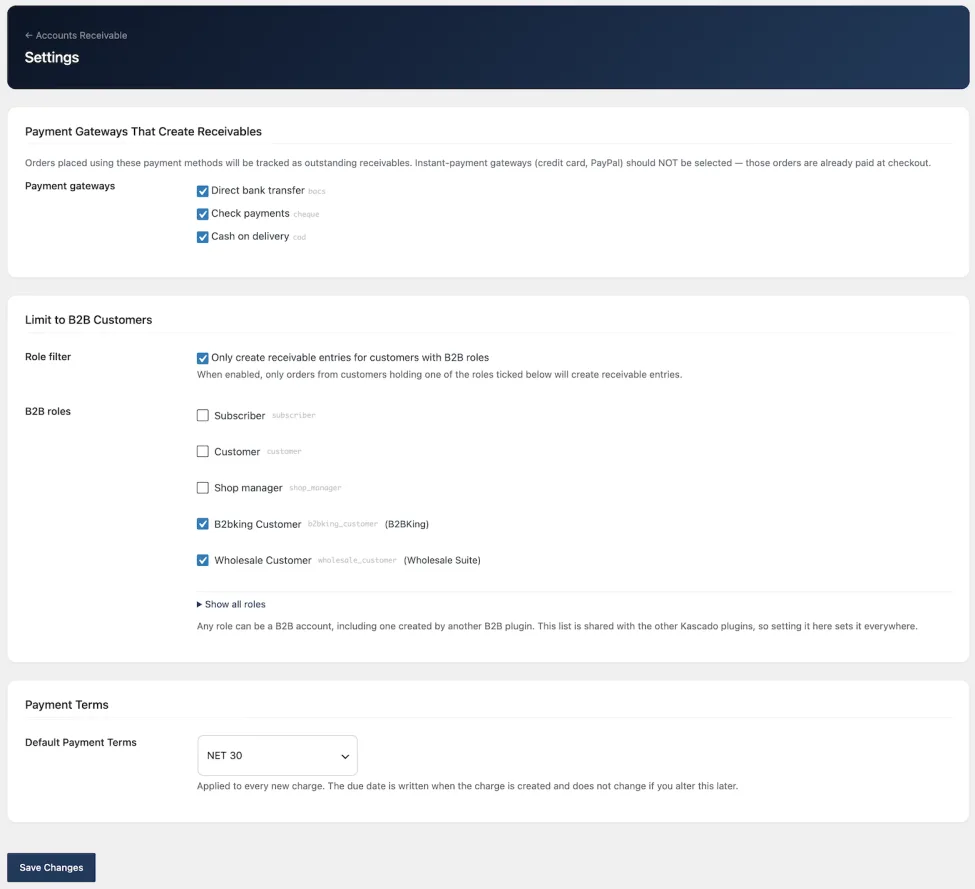
Settings screen with bank transfer, check and cash on delivery ticked as payment gateways that create receivables, a B2B role filter with two wholesale roles ticked, and default payment terms set to NET 30
Settings: choosing which payment methods create a receivable, which customer roles count as B2B accounts, and the store's payment terms.
Record Payment form with Payment, Credit and Write-off tabs, a selected customer with their current balance and open invoices listed oldest first, and fields for amount, date received, payment method, reference and note
Recording a payment. Choosing the customer shows their balance and their open invoices, oldest first, before you enter the amount.
Import Past Orders screen with Start Fresh and Import as Unpaid options, a start and end date, and a scan result listing how many orders are in the range, how many are already tracked and how many are new
Importing past orders as charges: scanning a date range reports how many orders it found, how many are already tracked, and what the rest are worth.
PRO

What Accounts Receivable Pro adds

The free plugin keeps the record straight. Pro is what you use to act on it.

Aging report

Every unpaid balance bucketed by how overdue it is — current, 1–30, 31–60, 61–90, and 90 days or more — per customer, with totals, a printable view and a drill-down per account.

Automatic reminders

A daily job emails customers whose oldest invoice has passed its due date, at one, seven, fourteen and thirty days. Each level sends at most once, and you can switch any of them off. Snooze an account for a week, a month or a quarter when you've spoken to them.

Per-customer payment terms

NET 30 for most, NET 60 for the two that negotiated it. Set on the customer's profile; applies to their future orders.

Credit limits

Set a limit per customer and see who is over it — on the dashboard, on the customer list, and on the aging drill-down with limit, balance and remaining headroom.

A balance page for your customers

A read-only Account Balance tab in My Account, where a customer can see their own outstanding invoices, what's overdue, and their recent payments — instead of emailing you to ask.

Exports for your bookkeeper

Aging, payment history and the full ledger as CSV, alongside the balances export in the free plugin.

COMPARE

What's in each

What the free plugin and Pro each include
Capability Free Pro
Charges raised automatically from orders Included Included
Record payments, credits and write-offs Included Included
Oldest-invoice-first allocation Included Included
Corrections with full audit trail Included Included
Refund, cancellation and order-edit handling Included Included
Balance, overdue and credits-held totals Included Included
Per-customer account page and history Included Included
Import from existing order history Included Included
Balances CSV export Included Included
Aging report by overdue bucket Not included Included
Automatic overdue reminder emails Not included Included
Per-customer payment terms Not included Included
Credit limits Not included Included
Customer-facing balance page Not included Included
Aging, payments and full-ledger CSVs Not included Included
Works with Kascado Customer Statements Not included Included

Pro installs on top of the free plugin and never replaces it. Your ledger stays where it is.

Accounts Receivable Pro

Accounts Receivable Pro is in development. Leave your email and we'll tell you once, when it's ready.

LIMITS

What this isn't

  • It doesn't take payments. No pay-now button, no card processing — it records money that arrived some other way.
  • It doesn't sync with QuickBooks or Xero. The exports are readable CSVs for a bookkeeper, not import-ready files.
  • It doesn't issue invoices. Your WooCommerce order is the invoice — separate numbers and PDFs are what Customer Statements is for.
  • It doesn't block anyone. Credit limits show who is over; they don't stop an order going through.
  • One currency. Orders outside your store's base currency aren't tracked or converted.
  • Registered customers only. Guest orders have no account to owe against.
WORKS WITH

Kascado for Wholesale

Accounts Receivable works fully on its own. It's part of Kascado for Wholesale, alongside Customer Dashboard and Customer Statements — each solving a different operational problem.

Free Live
Customer Dashboard B2B customer health analytics: which accounts are active, at risk or dormant, and the revenue tied to each. View plugin
Free Coming soon
Customer Statements Branded PDF customer statements for B2B WooCommerce stores, with bulk generation and email delivery. View plugin
FAQ

Common Questions About Accounts Receivable

It keeps a ledger of what each wholesale customer owes you. Orders placed on payment terms become charges. You record payments, credits and write-offs as money arrives, and every payment is applied to the customer's oldest open invoice first. The dashboard shows your total outstanding, how much is overdue, and which customers are carrying it. It's free on WordPress.org.

The free plugin is the record: charges, payments, allocation, corrections, balances, history and a CSV export. It is a complete receivables ledger on its own. Pro acts on that record — aging by overdue bucket, automatic reminder emails, per-customer terms, credit limits, a balance page for your customers, and more exports.

Yes, and that's the point. Your customers pay by cheque and bank transfer, days after the order ships — your store never sees that money arrive. Recording it is one short form per payment, and it's what makes the balance real.

You record the payment against the customer, not the order. It settles their oldest open invoice first, then the next, until it's used up. Anything left over is held as credit and applied automatically to their next order.

A credit appears, dated to the refund, applied first to that order's charge and then to whatever else is open. If you delete the refund in WooCommerce, the credit reverses. Cancelling an order withdraws its charge and releases any payment that had settled it.

You correct it rather than edit it. Recording a correction reverses the original entry and leaves both visible, with your reason attached. The history is append-only, so a balance can always be explained.

Yes. It decides what to track by payment method, not by which plugin manages your customers, so there's no integration step. If you want to narrow it to wholesale accounts only, there's an optional role filter that works with roles from any of those plugins, or roles you made yourself.

Those are paid at checkout, so there's nothing owing and no charge is created. This is for the gateways where the customer pays later.

Yes, from your existing WooCommerce orders. Choose a date range and the plugin brings those orders in as unpaid, at their full value, dated to the order. It's not a CSV import and it can't bring orders in as part-paid — if some were partly paid, record those payments afterwards.

Balances come from a dedicated indexed table and are calculated when you look at them, so there's no cache to go stale and no reconciliation step. Pro's reminders run in the background through Action Scheduler rather than in your admin session.

You can export CSVs and work from them, but they aren't shaped for direct import into either. The free plugin exports balances; Pro adds aging, payment history and the full ledger.

WordPress 7.0 or higher, WooCommerce 11.1 or higher, PHP 7.4 or higher. Tested up to WordPress 7.1. Multisite isn't supported yet.

Uninstalling removes the plugin's tables, settings and data. Your WooCommerce orders are never touched. Deactivating leaves everything in place, so you can reactivate without losing history.

Get Accounts Receivable

Free forever. No license, no limits. Available now on WordPress.org.